Process guide
Check in a guest
Time3 minutes
- Owner
- Manager
- Front desk
- Night audit
DifficultyMedium
Welcome a guest who has a booking: confirm the room, the guests and the payment, then check them in.
Purpose
Section titled “Purpose”The guest arrives at the desk and you hand over the room. The check-in registers who stays, assigns the room and takes any payment due, so the stay starts with a correct folio.
Ingredients
Section titled “Ingredients”- Permissions: to check guests in. Taking a payment on the same sheet also needs the permission to take payments, which these roles have.
- Information: the guest’s name or booking number, and an ID for every guest your hotel registers.
- State: the booking is confirmed for today and has a room, or a free room can be picked. A cashier shift is open if the guest pays in cash.
Expected result
Section titled “Expected result”The guest is in the hotel, in a room, with the registration saved and any payment on the folio.
-
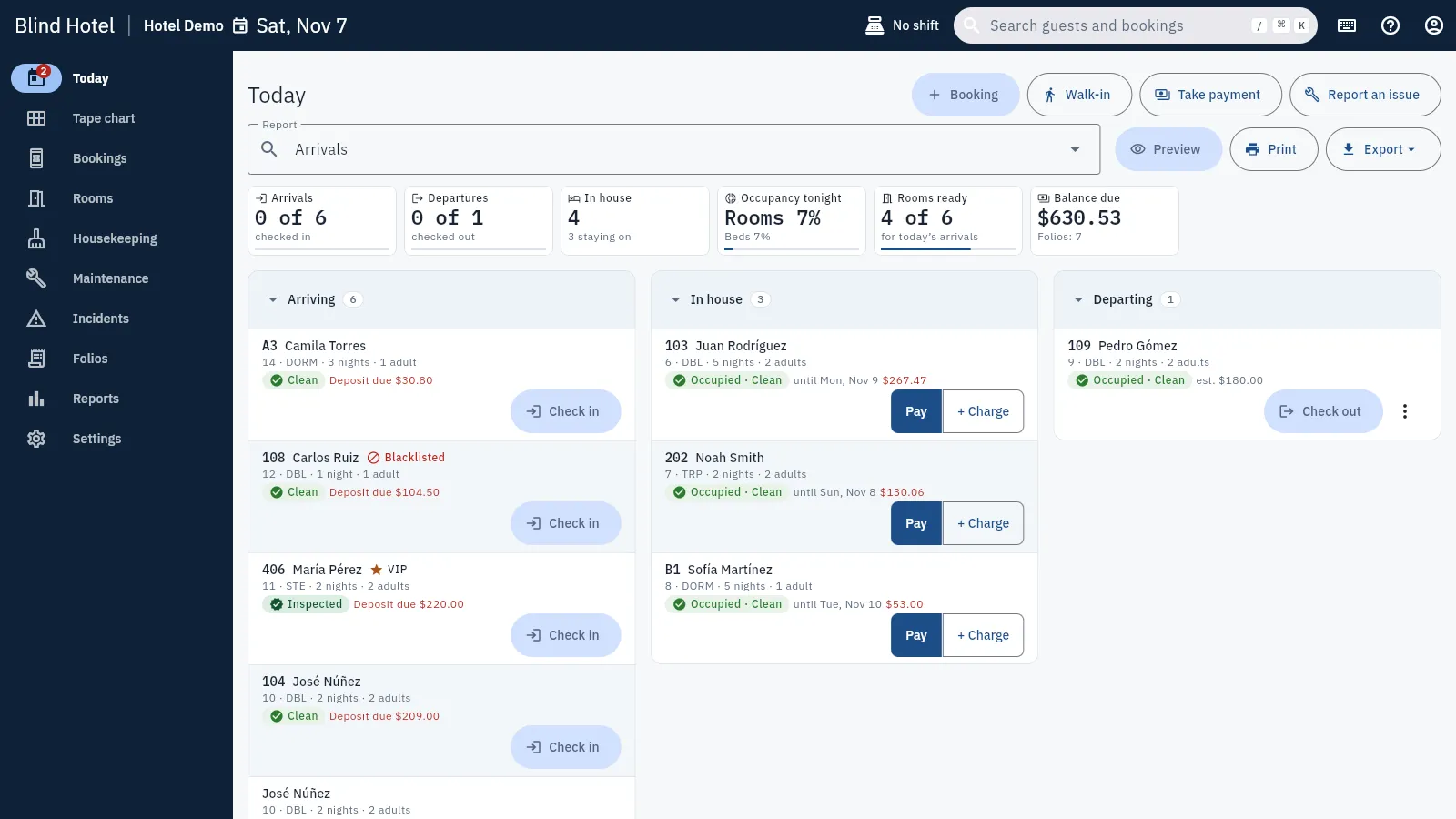
Go to Today and find the guest under Arriving.
-
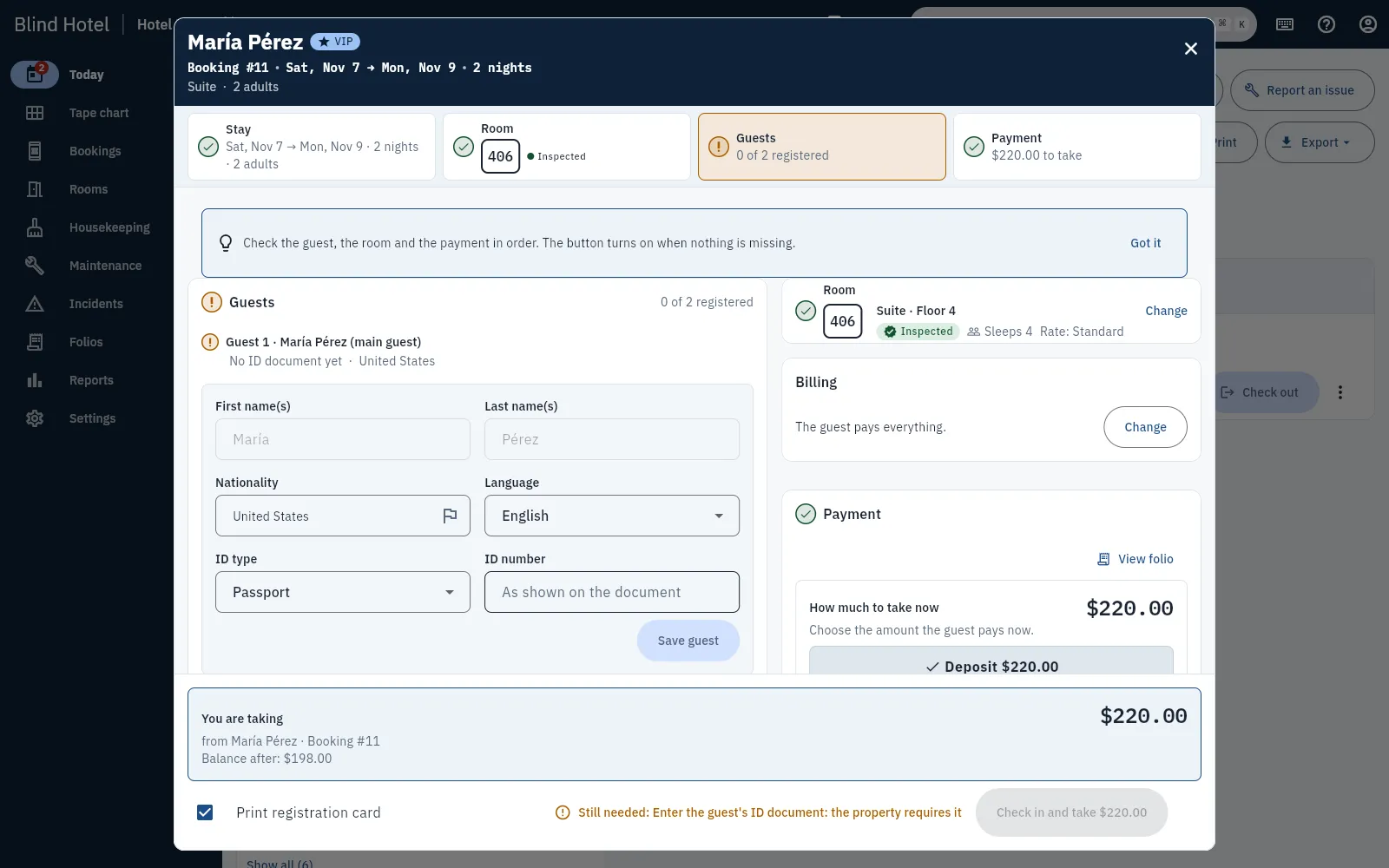
Tap Check in on the guest’s row. The check-in sheet opens.
-
Read the footer. It lists what the sheet still needs, such as “Still needed: Enter the guest’s ID number”. The button stays off until nothing is missing. The box Before checking in, when it shows, adds notices, such as a deposit that is not fully paid.
-
In Stay, check the dates. If the booking began on an earlier day, choose what happens to the missed nights: charge them, or Move the arrival to today (no charge). Moving it asks for a reason.
-
In Room, tap Change to open the card. If the booking has no room, the sheet picks the best free one. To choose another, tap Change room, type or rate.
-
In Guests, type the name, nationality, ID type and ID number of each guest who has no ID yet, then tap Save guest. For another adult, tap Add companion. For a child, tap Mark as child: no ID is needed. If your country asks for more, a folded Registration details shows under the guests: open it and fill in what it lists.
-
In Payment, choose How much to take now and How the guest pays. To check in without taking money, choose Other amount and clear the amount.
-
Check that the footer says Ready to check in. Print registration card is ticked if your hotel prints it.
-
Tap Check in, or Check in and take with the amount.
Check your work
Section titled “Check your work”- A message says the guest is checked in, and in which room.
- The registration card prints in the guest’s language, if it was ticked. Ask the guest to sign it.
- On Today, the guest is under In house. The arrival row stays under Arriving, marked In house. The room shows as occupied.
- If you took money, the payment is on the guest’s folio.
What next
Section titled “What next”- Checked in by mistake? On the same day, open the booking, tap More, then Undo check-in. It asks for a reason and is refused once something was posted to the folio since.
- A booking with more than one room shows Also on this booking. The ready rooms check in together.
- To take a payment later, see Take a payment. When the guest leaves, see Check out a guest.
- For every part of the sheet, see The check-in sheet.
- If the app refuses, see When the app says no at the desk.
Considerations
Section titled “Considerations”- What the sheet asks depends on your hotel’s rules: an ID, every adult registered, a deposit, only inspected rooms. Each one shows in the footer.
- Registration details exists only when your country pack requires more about guests, such as sex, residence, place of birth, document dates, role in the stay or purpose of the trip. With no requirement the sheet looks as it always did. When it is required and missing, the sheet says the registration details are missing and the guest cannot be checked in until they are filled in.
- If the hotel requires a deposit that is not paid, only a manager can check the guest in, with Manager’s reason (required). Anyone else sees that a manager must do it.
- For a warning, such as a dirty room, tick I’ve seen the warnings. A room still occupied blocks the check-in.
- If the payment method goes on your cashier shift and none is open, the payment box says “Open a shift first”. Tap Open shift.
- You can also tap Check in in the booking panel or on a row of the Bookings list.