Process guide
Check out a guest
Time3 minutes
- Owner
- Manager
- Front desk
- Night audit
DifficultyCareful
Settle the bill, take any payment still due, and check the guest out.
Purpose
Section titled “Purpose”The guest leaves, or has stayed past the departure day. The check-out closes the stay, settles the folio, and passes the room to housekeeping.
Ingredients
Section titled “Ingredients”- Permissions: to check guests out. Taking a payment on the same sheet also needs the permission to take payments, which these roles have.
- State: the guest is in the hotel. A cashier shift is open if the guest pays in cash.
- Information: anything the guest took last, such as the minibar, so you can add it before settling.
Expected result
Section titled “Expected result”The guest is checked out, the folio is settled, the room is marked dirty for housekeeping, and the receipt is printed if you asked for it.
-
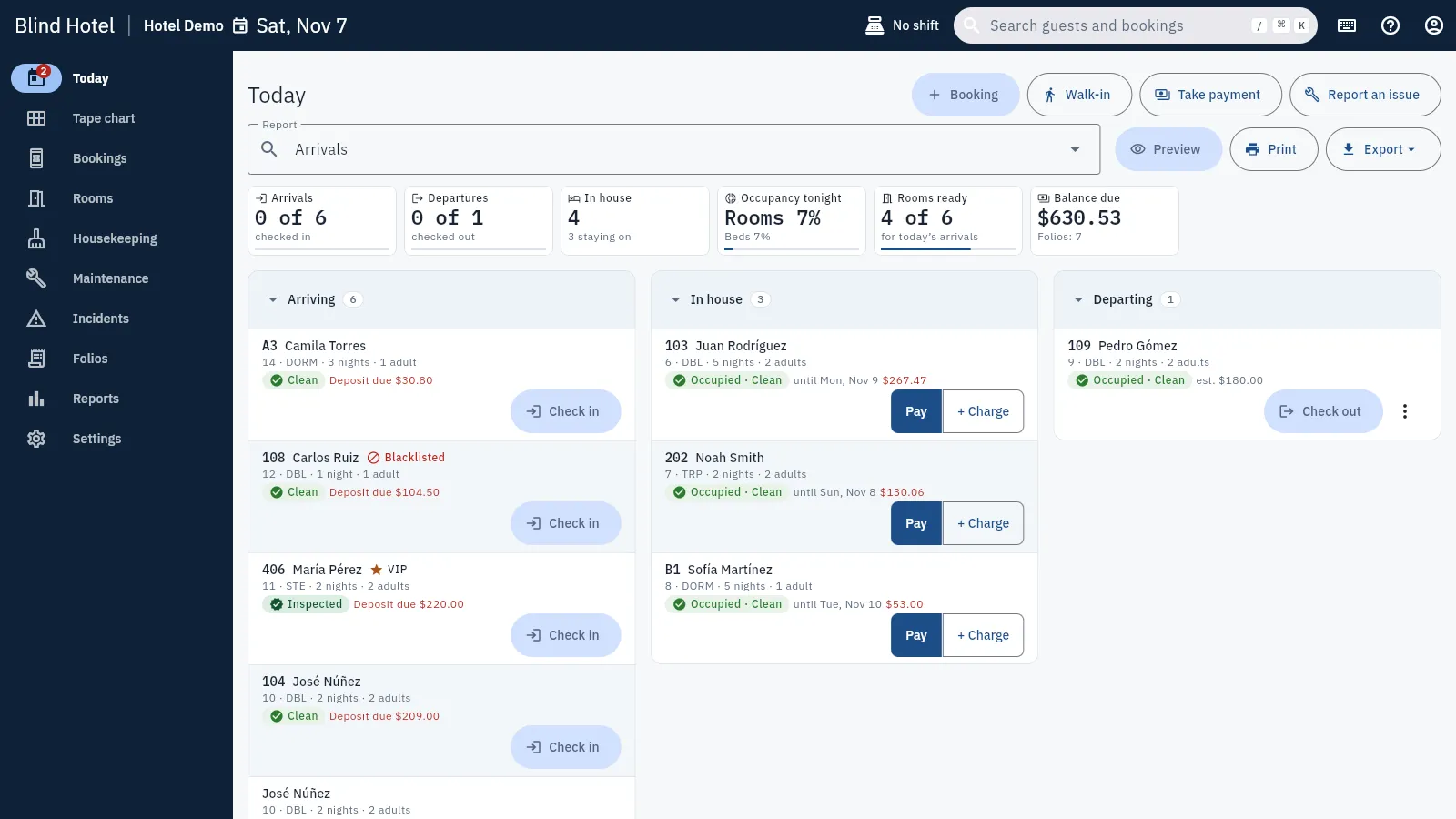
Go to Today and find the guest under Departing.
-
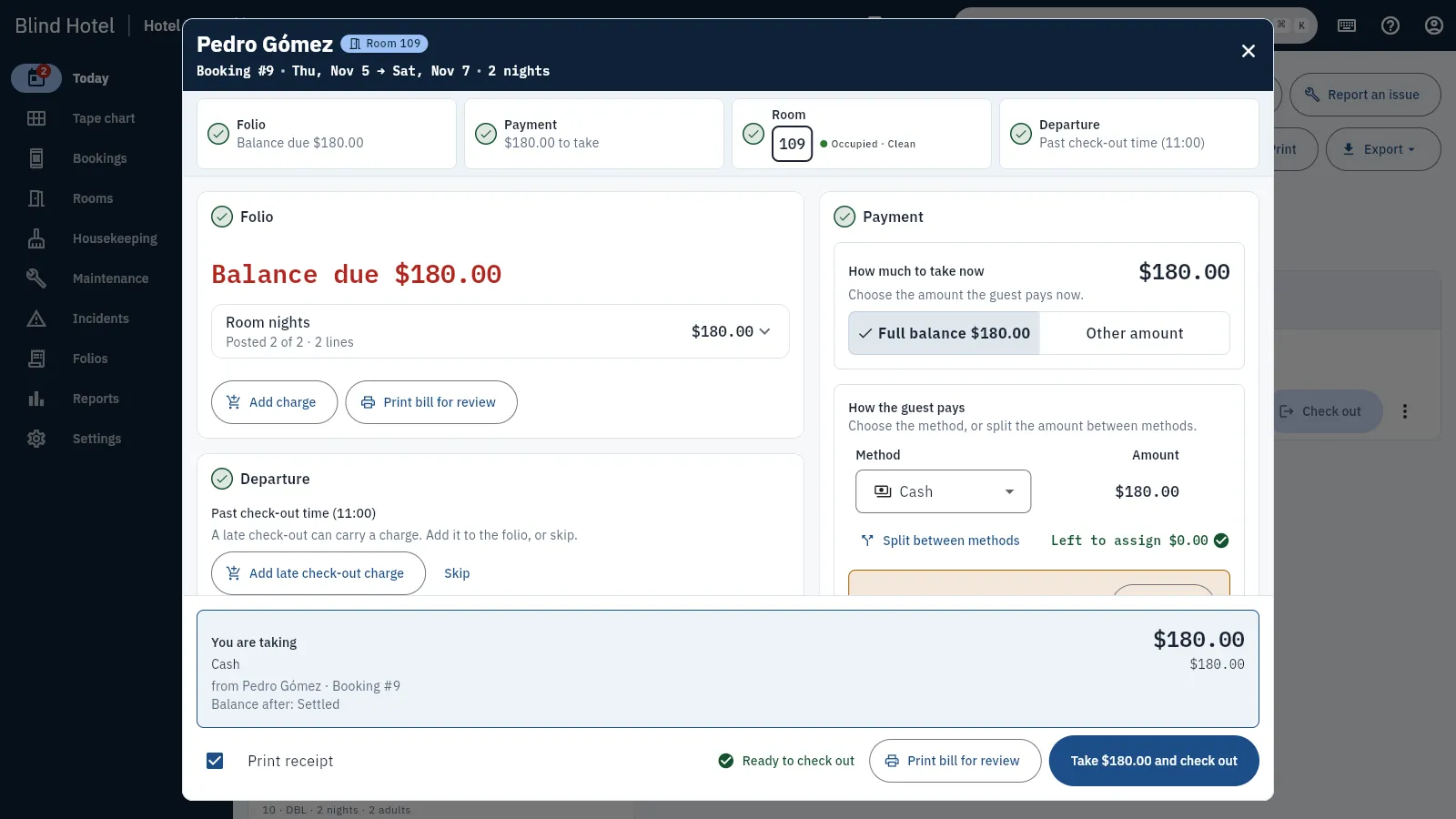
Tap Check out on the guest’s row. If the Balance due is zero once the last nights are posted, the guest is checked out at once and a message keeps Undo for a few seconds. If there is a Balance due, the check-out sheet opens.
-
Read Folio, the charges and payments so far. If something is missing, tap Add charge. To show the guest the bill first, tap Print bill for review.
-
Read Departure. If the guest is past the check-out time, tap Add late check-out charge, or tap Skip. If the guest leaves before the booked day, tick the box that starts with “Leaving”, such as “Leaving 1 night early”.
-
Read Payment. If a balance is due, How much to take now offers the full balance. Choose How the guest pays. A deposit already paid is shown there.
-
If the guest has a credit, the footer offers Refund with the amount. Owners and managers can also choose Keep as credit.
-
Read Room. If someone arrives in the room today, the switch that ends with “Rush clean” is on. Switch it off if you do not want housekeeping to hurry.
-
Check that the footer says Ready to check out. Print receipt is ticked at first.
-
Tap the main button. It reads Check out, or, when money is taken, “Take”, the amount and “and check out”.
Check your work
Section titled “Check your work”- The sheet closes and a message says the guest is checked out, with Undo.
- The receipt prints if Print receipt was ticked.
- On Today, the guest leaves Departing. The room shows as dirty, or as a rush clean if you kept the switch on.
- The folio shows a zero balance, or the credit you chose to keep.
What next
Section titled “What next”- Checked out by mistake? Tap Undo in the message while it is on screen. See When the app says no at the desk for when Undo is refused.
- Check out all settled on Today checks out every guest who owes nothing, after you confirm the names.
- To print the receipt again later, open the guest page and look in Documents.
- For every part of the sheet, see The check-out sheet. To take a payment on its own, see Take a payment.
Considerations
Section titled “Considerations”- Only owners and managers can leave a balance open, and only with two-step sign-in. For everyone else the sheet says “Settle the folio before checking out.”
- Checking out from the booking panel always opens the sheet, so you can add a late check-out charge there.
- An early departure cannot be undone, because its later nights go back on sale. Book the guest again if you need to.