Screen guide
Lodging taxes
At a glance
- Purpose
- Set the taxes a city or a state charges for a stay, apart from the sales tax, so every price and every bill includes them.
- Who uses it
- Owner
- Manager
- Where to find it
- Menu, Settings, then Lodging taxes
City, state and tourist taxes: how each one is charged, who does not pay it and when it is paid.
The screen
Section titled “The screen”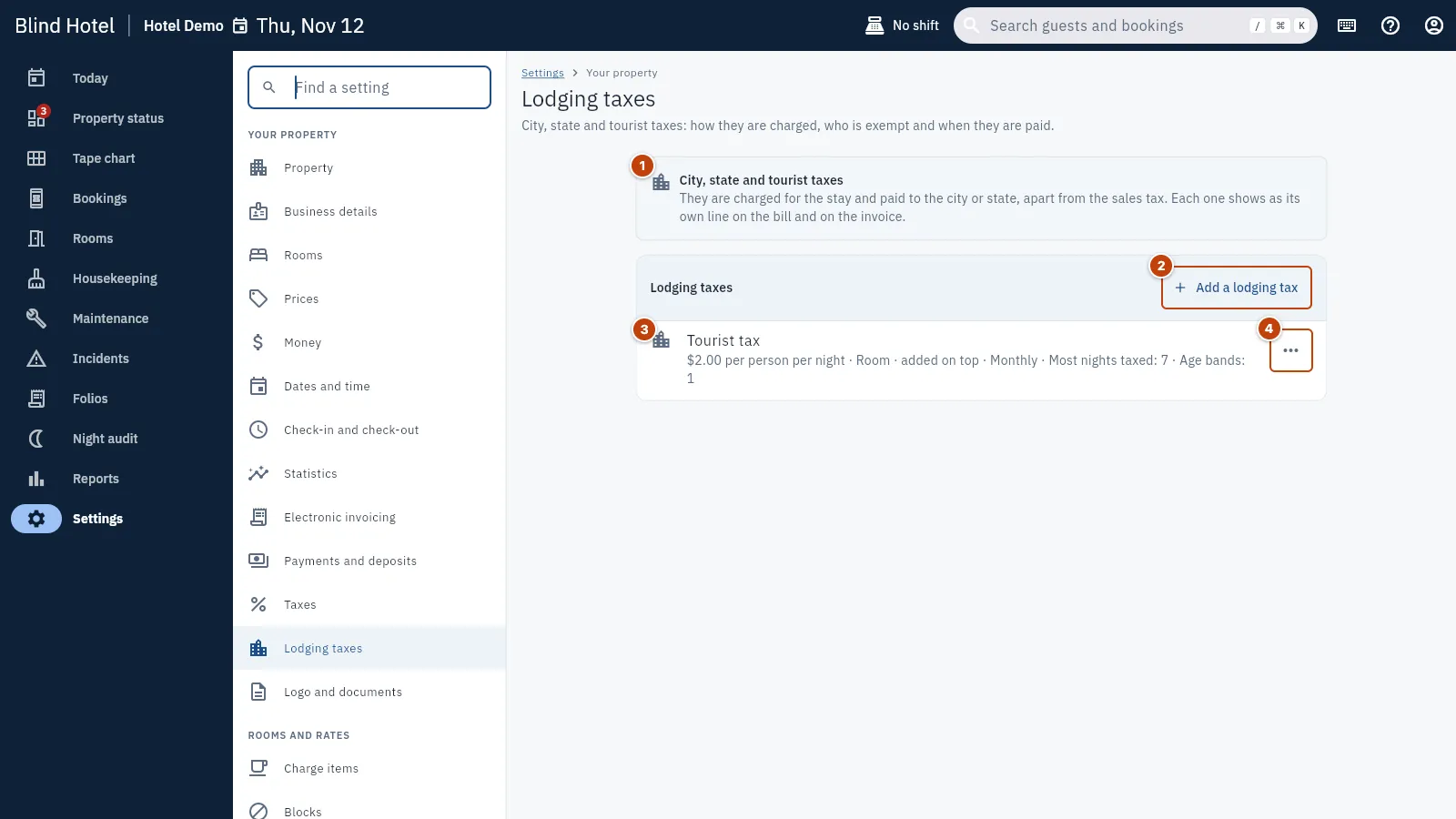
Parts of the screen
Section titled “Parts of the screen”- City, state and tourist taxes: a note on what these taxes are. They are charged for the stay, paid to the city or the state, and shown as a line of their own on the bill and on the invoice.
- Add a lodging tax: opens the window to create one.
- Tourist tax: one row for each tax. Under the name, one line says how it is charged, how often it is paid, who receives it, the most nights taxed, and how many age bands and exemptions it has.
- More actions: Edit, Prices by season… and Archive.
Options and filters
Section titled “Options and filters”These are the fields of the window that opens with Add a lodging tax or Edit.
- Start from: begin with Tourist tax: per person per night, children exempt, City tax: a percent of the room rate or A blank tax. These are examples to copy and change. The amounts start empty because the amount is whatever your city or state says.
- How it is charged: Percent of the room rate, Per room per night, Per person per night or Per stay.
- Included in the price: on, the price already contains the tax and it is only shown; off, it is added on top.
- Most nights taxed: the tax stops after this many nights of one stay. Empty taxes every night.
- How often it is paid: Monthly, Quarterly or Yearly. The Lodging tax return report follows this.
- Authority that receives it (optional): who you pay. It prints in the return report.
- Age bands: for a tax per person only. Each band has From age, Up to age (not included) and Pays (%). 0 means the age is exempt; 50 means half. An age that fits no band pays all of it, and so does a guest whose age is not known.
- Exemptions: Residents (of a country, a region or a city), Trips for these purposes, Long stays (no tax after a number of nights), People with a disability (the front desk records a document number) and Manual exemptions (the front desk records a reason). The last two are recorded for a guest on the booking.
Actions
Section titled “Actions”- Add a lodging tax: opens the window with Start from on top.
- Save: keeps the tax. It starts on the day you save it.
- Edit: opens a tax in the same window.
- Prices by season…: gives the tax another amount for a range of dates. Nights that were already charged never change.
- Archive: stops the tax for new nights and keeps what was charged. Restore brings it back.
Colours, icons and badges
Section titled “Colours, icons and badges”- An archived tax is listed under Archived taxes with the word Archived.
- If you cannot manage prices, the page shows the taxes and has no buttons.
Phone and desktop
Section titled “Phone and desktop”- On a phone the window is a full page and the fields are one under the other.
Common questions
Section titled “Common questions”- Is this the sales tax? No. The sales tax (VAT) is in Taxes. A lodging tax goes to the city or the state and has its own line.
- Do the amounts come with the app? No. The app does not know the law of any place. Ask your city or state for the amount, who is exempt and when it is paid.
- Does a change touch nights already charged? No. A change or a season applies to nights not charged yet.
- Where do I see what to pay? In the report Lodging tax return, in Reports.